
Häufig gestellte Fragen zu Gesundheitstests für Haustiere
Clear answers about choosing a kit, using it correctly, reading a result and knowing what to do next.
Urgent concern? Skip home screening.
Seek veterinary care for breathing trouble, collapse, severe weakness or rapidly worsening signs. Bite, wildlife-contact or possible rabies-exposure cases should follow veterinary and local public-health guidance. For human exposure, seek medical or public-health advice promptly.
Before You Buy
Choose by species, target and sample type—not by symptoms alone.
Welches Set sollte ich für mein Haustier wählen?
What does each kit detect—and what does it not detect?
Each kit screens only for the target or targets named on its product page and packaging. It is not a full health check and it does not screen for unrelated infections, parasites or other causes of similar signs.
Review the product-specific “Screens for” and “Does not screen for” information before purchase.
Two limitations are especially important. The Dog & Cat Heartworm Antigen Test Kit does not rule out recent infection, and a negative antigen result is less conclusive in cats. The Dog & Cat Toxoplasma Antigen Test Kit screens a pet stool sample only; it does not assess human infection, pregnancy status or whether a household is risk-free.
What sample does the kit need—and do I have to draw blood?
The required sample is shown on every product page before you buy. Most VitapawTech kits use a stool sample or swab; the Dog & Cat Heartworm Antigen Test Kit uses a small blood sample.
Follow the exact sampling guide for that kit. If you are not comfortable collecting a blood sample, ask a veterinarian or vet nurse for help rather than attempting it under pressure.
What comes in each box, and why are there two tests?
Each product page shows the exact contents for that kit. Every home box contains two independent, single-use tests, the matching collection and handling components, and QR access to the correct app guide. Both are fully usable tests; neither is a practice test.
The second test is there for an invalid first test, a repeat recommended by the guide for your exact kit or a future need.
Do not use the second home test to confirm a positive result. Home kits arrive with at least eight months remaining before expiry, so an unused sealed test can be kept under the storage conditions stated on its packaging. Exact components vary by kit; no sample needs to be mailed to a laboratory, and most kits show a result in about 10–15 minutes.
Using the Kit & App
Open the matching guide, prepare first and keep the test within its valid window.
How do I open the correct app guide for my kit?
Scan the QR code inside the box to open the guide matched to that product. Confirm the kit name and sample type on screen before you begin.
If the guide does not match the packaging in front of you, stop and open the correct guide rather than continuing.
Do I have to use the app or create an account?
You can use the product instructions supplied with the kit, and you can open the matching app guide as a guest without creating an account.
Sign in when you want to save and revisit records, manage more than one pet, add follow-up information or create supported shareable summaries.
I already completed the test—can I upload the result photo afterward?
Yes, if the photo itself was taken within the kit’s valid reading window. You can upload that photo to create or complete a record.
Do not rely on a cassette photographed later, because its appearance may change after the stated reading window.
What happens to my photos and my pet’s data?
VitapawTech uses information you choose to provide to support app-guided features, saved records, report generation and customer support. It does not sell personal data.
Data is kept only as long as needed for the stated service, legal or security purpose. You can request access, correction or deletion by contacting us; see the Privacy Policy for the complete terms.
What common mistakes should I avoid?
Common errors include opening the wrong guide, using the wrong sample, adding the wrong amount, moving the test after starting or reading it too early or too late.
Set everything out first, keep the cassette flat and follow the exact kit guide rather than a guide saved from another product.
Reading Your Result
A screening result reflects one sample at one moment—not a complete diagnosis.
What do C and T mean?
C = Control. The C line must appear for the test to be valid. T = Target. A visible target line inside the valid reading window counts as a positive screening result.
Negativ — C line only
Positiv — C + T line, including a faint T line
Ungültig — T line without a C line
Ungültig — No control line
Was bedeutet ein negatives Ergebnis?
A negative result means the target signal was not detected by this screening test at the time of testing.
It does not rule out infection or disease. Timing, sample quality and other factors can affect detection. Contact a veterinarian if signs continue, worsen or do not fit the result.
Was bedeutet ein positives Ergebnis?
A positive screening result means a target signal was detected. It is not, by itself, a diagnosis.
Save the result and contact your veterinarian for confirmation and next steps. Do not use the second home test to confirm the positive result, and do not start, stop or change treatment based on the kit alone.
Does a faint test line count as positive?
A visible target line inside the valid reading window counts as a positive screening result, however faint, as long as the control line is present. Always match the line position to the guide for your exact kit.
Line strength does not show how severe or advanced a condition is. Save a clear photo taken inside the read window and contact your veterinarian; do not interpret a line that appeared only after the window closed.
What if no control line appears?
The result is invalid. Do not interpret any test line when the required control line is missing.
Repeat once with an unused test and follow the exact guide. If a second test is also invalid, contact support with your order number, lot information and clear photos.
Can recent vaccination or testing time affect the result?
They can affect some screening results. The relevant timing and limitations depend on the target and test method, so there is no single rule for every kit.
Record the vaccine name and date, follow the product-specific guide and share that context with your veterinarian. Do not dismiss a positive result because of a recent vaccination without veterinary interpretation.
How does the app record a 2-in-1 or 3-in-1 result?
The matching guide shows which test position corresponds to each target and lets you record the target lines separately.
One target line does not determine the others. The required control line must still appear for the cassette to be valid.
After Your Result
Save the context, add what changes and share the record when follow-up is needed.
Should I test again after 72 hours?
Not for every kit. Use a 72-hour repeat only when the guide for your exact kit recommends it. Different tests detect different biological targets, and those targets do not become detectable on the same timeline.
Invalid result: Review the instructions and repeat with an unused test. You do not need to wait 72 hours after an invalid result.
Positive result: Do not retest to confirm it at home. Save the result and contact your veterinarian promptly.
Negative result and your pet is well: Routine precautionary retesting is not needed. Keep the second test for a future need and store it as directed.
Negative result but your pet is still unwell: Follow the timing in the guide for that exact kit and contact your veterinarian. Do not delay care while waiting to retest if signs are persistent, severe or worsening.
The Dog & Cat Heartworm Antigen Test Kit is an important exception. Heartworm antigen can take months to become detectable after exposure, so repeating the test a few days later is not meaningful. Ask your veterinarian when to test based on your pet’s species, exposure and prevention history.
What if the result is negative but my pet still seems unwell?
Do not treat the negative result as an all-clear. Contact your veterinarian when signs persist, worsen or remain concerning.
Skip home screening and seek urgent care for breathing trouble, collapse, severe weakness or rapidly worsening signs.
Why might my result differ from my veterinarian’s?
Home screening and clinic testing may use different methods, sample handling and sensitivity. Timing, sample quality and storage can also change what each test detects.
Share the home result and its timing with your veterinarian, then follow their clinical advice. It is normal for a veterinarian to repeat testing before deciding what to do next.
What happens after I upload a result photo, and what is saved?
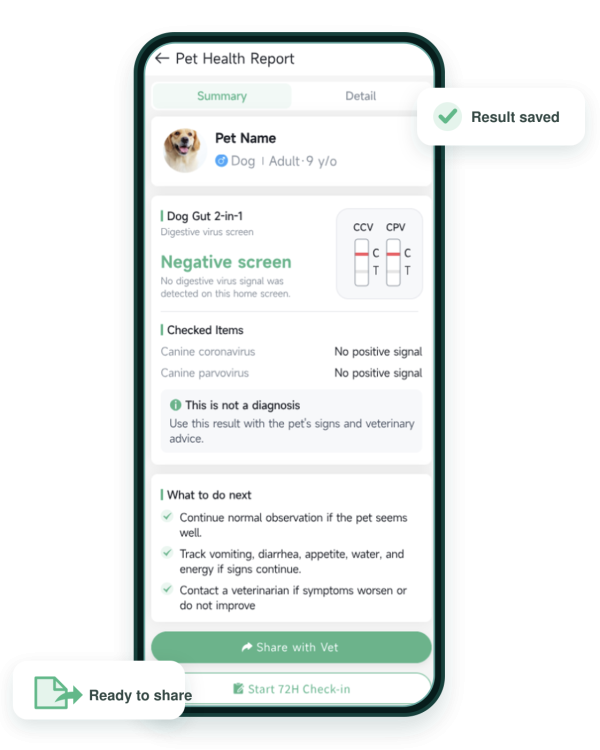
The app opens the matching line-layout guidance and lets you save the result image with the kit, test date, selected result details and supported notes in one record.
When signed in, you can return to supported records and add follow-up notes or photos, including observations from the 72-hour check-in and, when the guide for your exact kit recommends it, a repeat-test result.
The check-in is a record reminder—not a universal instruction to retest. Uploading a photo does not create a diagnosis.
Can I create a Vet PDF, and is it sent automatically?
Open the saved record and use the supported export or share option to create a concise PDF for veterinary follow-up. You choose when and with whom to share it; nothing is sent to a veterinarian automatically.
The PDF is a home screening record, not a laboratory report. Your veterinarian may still recommend an examination or repeat testing with another method, and that is normal.
Shipping & Returns
Check the seal, expiry and contents before you start—and contact us before using a damaged kit.
Where do orders ship from, how long does delivery take, and is VAT included?
Home orders outside North America are generally fulfilled from Germany. North American home orders are generally fulfilled from a U.S.-based warehouse where available.
Available delivery estimates, shipping charges, VAT, taxes and promotions are shown at checkout before payment. Business and pilot orders may follow separate written arrangements.
How long is the shelf life, and where is the expiry date?
The shelf life is 24 months from the date of manufacture. The lot and expiry information appear on the foil pouch and outer packaging.
Home kits are supplied with at least eight months remaining before expiry when they arrive. Store the kit only under the conditions stated on the packaging and product guide, and do not use an expired kit.
Can I return a kit?
Unopened and unused home kits may be returned within 30 days, subject to the Refund Policy. Contact us before sending anything back so we can confirm eligibility and the correct return instructions.
Opened, unsealed, used or sample-contact kits cannot be returned for hygiene and traceability reasons. Product defects and invalid tests are reviewed separately from standard returns.
What if the pouch is damaged, open or the test does not work?
Do not use a pouch that arrived damaged, open, leaking, incomplete, incorrect or expired. Keep the packaging and contact support with your order number, lot details and clear photos.
If no control line appeared, the result is invalid. Review the guide and repeat with the second test; there is no need to wait 72 hours after an invalid result. Contact support if the problem continues. After review, we may offer a replacement, refund, missing component or another appropriate solution under the current policy.
How quickly will support reply?
We aim to reply to product, order, app and replacement questions within one business day. Include your order number, product name and clear photos where relevant so we can review the issue faster.
Support can help with the product and app, but it cannot provide veterinary advice. Contact a veterinarian for urgent, severe or worsening signs rather than waiting for a support response.
MORE THAN A TEST KIT
The result is one moment.
The record keeps going.
Save the result image, add supported follow-up notes and create a clearer summary to share when a veterinarian, sitter or care team needs the context.

01 · Guide
Open the matching kit workflow.

02 · Record
Keep the result and test context together.

03 · Follow up
Add supported notes and photos over time.

04 · Share
Export a concise record when you choose.
COMMUNITY GIVING
Shelter or rescue organization? Learn about our product-donation program and community support.
FOR BOARDING & DAYCARE
Using VitapawTech in a boarding or daycare setting?
See how app-guided screening and saved records can support selected check-in, during-stay and handover cases. Review the workflow, pilot options, pricing and available documents.

Intake

Handover
Save Record
Safer Care
STILL NEED HELP?
Tell us where you got stuck.
Contact us for product, order, document or pilot support.
 English
 German
 French
 Spanish
 Chinese